Why RTO/RPO Is Failing Most Companies — And How Automation Fixes It

Table of Contents
RTO (Recovery Time Objective) and RPO (Recovery Point Objective) are crucial metrics that define how quickly an organization can restore operations and how much data it can afford to lose. Yet, despite their importance, most companies consistently fail to meet these targets.
In this blog, we’ll explore why RTO and RPO are failing most companies and how automation in disaster recovery can bridge the gap, ensuring robust business continuity.
The Reality of RTO and RPO Failures
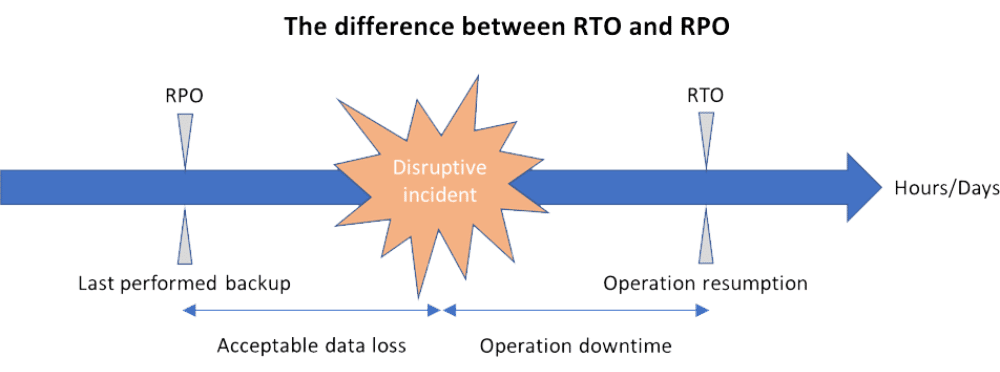
RTO defines the maximum acceptable downtime after a disaster, while RPO indicates the maximum tolerable data loss measured in time. Ideally, businesses aim to resume operations within the RTO and limit data loss to the RPO. However, surveys show that over 70% of companies fail to meet these objectives during real-world disasters.
Common Causes of Failure
- Manual Processes
Many organizations still rely on manual scripts and human intervention to recover systems. Manual restoration is not only slow but also prone to errors, increasing downtime and data loss.
- Inadequate Testing
RTO/RPO are only meaningful if tested under realistic disaster scenarios. Unfortunately, many IT teams run simulations infrequently or under ideal conditions, leaving them unprepared for actual outages.
- Complex IT Environments
Modern enterprises operate hybrid environments with on-premises servers, cloud platforms, and SaaS applications. Coordinating recovery across these diverse systems without automation is extremely challenging.
- Outdated DR Solutions
Legacy disaster recovery (DR) solutions may not support rapid recovery or granular RPO objectives. They often rely on periodic backups, which can result in significant data loss.
- Underestimating Human Error
Human mistakes during a crisis—misconfigurations, missed steps, or miscommunication—can extend downtime far beyond the RTO and increase RPO violations.
The Business Impact of Failing RTO and RPO
When an organization fails to meet its RTO or RPO, the consequences are severe:
- Revenue Loss: Downtime leads directly to lost sales, missed opportunities, and delayed operations.
- Customer Trust Erosion: Clients expect reliable services. Failure to recover quickly can damage your reputation permanently.
- Compliance Violations: Many industries have regulatory requirements for data retention and recovery. Missing RPOs or exceeding RTO can result in penalties.
- Operational Disruption: Business processes dependent on IT systems are stalled, affecting productivity and collaboration.
How Automation Solves RTO and RPO Failures
The most effective way to meet RTO and RPO consistently is through automation. By leveraging intelligent automation in your business continuity and disaster recovery (BC/DR) strategy, organizations can reduce downtime, limit data loss, and achieve predictable recovery outcomes.
Key Advantages of Automated DR Solutions
- Rapid Failover
Automation enables instant failover to backup systems or cloud environments. Systems can be restored in minutes, not hours, dramatically improving RTO.
- Frequent, Consistent Backups
Automated systems allow continuous or near-continuous backups, ensuring that your RPO is as low as possible, sometimes in seconds.
- Elimination of Human Error
Automation minimizes manual intervention, reducing mistakes during recovery and ensuring the recovery plan is executed exactly as designed.
- Scalable Recovery Across Hybrid Environments
Modern DR solutions powered by automation can coordinate recovery across cloud, on-premises, and hybrid infrastructures seamlessly.
- Regular Testing and Compliance Reporting
Automated DR platforms can simulate disasters and generate reports, validating that RTO and RPO targets are achievable and compliant with regulations.
- Proactive Monitoring and Alerts
Automated systems monitor workloads continuously and alert IT teams to potential risks before they turn into downtime incidents.
Case Study: Automation in Action
Consider a mid-sized financial services firm that struggled with manual recovery. During a ransomware attack, it faced an estimated downtime of 12 hours and potential data loss of 8 hours.
After implementing an automated disaster recovery solution:
- Downtime was reduced to under 30 minutes.
- Data loss was minimized to less than 5 minutes.
- Regular simulations ensured compliance with regulatory mandates.
This is the transformative power of automation: predictable, repeatable RTO and RPO fulfillment that protects both revenue and reputation.
Choosing the Right Automation-Driven DR Solution
When selecting an automated disaster recovery solution (CT-DR), organizations should look for:
- End-to-end orchestration across multi-cloud and on-premises systems
- Real-time monitoring and alerting capabilities
- Fast failover and failback to meet RTO
- Continuous backup to meet aggressive RPO
- Regular, automated testing and reporting
One leading solution that addresses these needs effectively is CT-DR. It leverages automation to simplify DR processes, reduce human intervention, and ensure business continuity—even in the face of complex disasters.
Conclusion
Failing to meet RTO and RPO is a widespread issue that jeopardizes operations, revenue, and customer trust. Traditional, manual DR processes are no longer sufficient for modern, hybrid IT environments. By adopting automation in disaster recovery, organizations can reduce downtime, limit data loss, and ensure regulatory compliance with confidence.
For companies ready to elevate their disaster recovery strategy, CT-DR provides an automated, reliable solution that turns RTO and RPO from aspirational targets into guaranteed outcomes.
Ensure your business continuity and disaster recovery are future-ready. Explore CT-DR’s automation-driven solutions and protect your operations today.